Hubs USB-C Docks Multiports
4K@144Hz KVM Switch 2 PC 2 Monitor 8K
€75.99
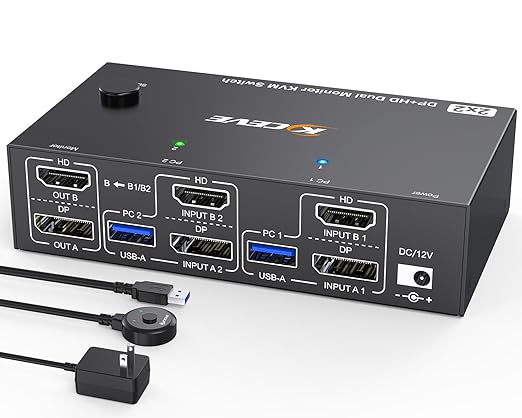
2 PC 2 Monitor KVM Switch. This TCNEWCL dual monitor KVM switch allows two computers or laptops to share two HD monitors and four USB 3.0 ports, for devices such as mice, keyboards, printers, hard drives, etc. It also supports extended display mode and mirror mode. Note: Ensure your computers have DisplayPort and HDMI ports. If not, you may need to use a docking station or other adapter for this functionality.
Ultra High Definition 8K. This 2 PC 2 monitor KVM switch supports up to 8K@60Hz / 4K@144Hz and is backward compatible with 2K@144Hz, 1080P, etc. It allows you to connect two sources with different resolutions and automatically identifies the resolution when switching between signal sources.
DisplayPort HDMI KVM Switch with 4 USB 3.0 Ports. This dual-monitor HDMI 2.1 + DP 1.4 KVM switch supports ultra-fast USB 3.0 data transfer speeds of up to 5 Gbps, allowing you to connect keyboards, mice, printers, and other USB peripherals with USB 2.0/1.1 equipment.
Excellent Compatibility. The MLEEDA HDMI DisplayPort KVM Switch supports two PCs and two monitors. It comes with a free driver for Windows and macOS. Plug and play, but an external 5V adapter is required when using USB devices such as HDDs, SSDs, etc., with this DisplayPort Dual Display KVM switch. You can change the LED color by pressing the button on the panel below or using the included wired remote control. The remote indicates the active computer.
Dual Monitor KVM Switch with Dual Display and Wide Compatibility. The HDMI DisplayPort KVM switch supports many types of input devices such as PCs, laptops, Apple TVs, and mini set-top boxes.
Note. The mleeda 2 PC 2 Monitor KVM switch requires two DisplayPort outputs per computer. If your PC does not have a DisplayPort output, you will need to purchase an adapter from your preferred HDMI to DisplayPort, mini DisplayPort to DisplayPort, or USB-C to DisplayPort adapters. This DisplayPort KVM switch does not support EDID simulation or booting.